Best AI for Jewelry Photography in 2026: Six Tools Compared
We scored six AI tools on one vintage ring for generation quality, features and price. Here is the best AI for jewelry photography, and where each free tier stops.
 Daria BazankovaPublished 24 Aug 202614 min read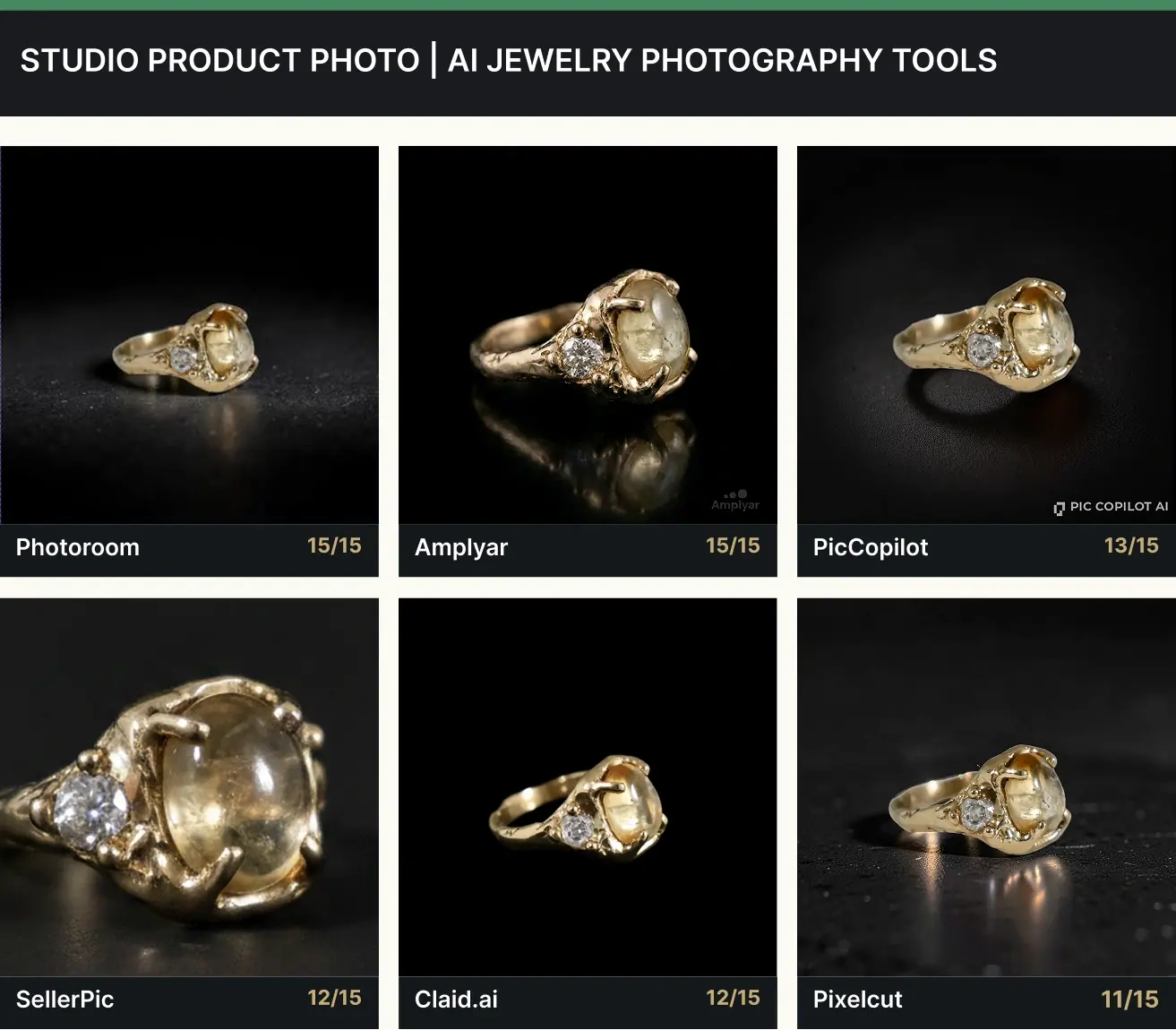
Key takeaways
- We ran a scored experiment rather than a feature round-up. One ring, six tools, three criteria marked out of five, in two scenarios: a studio product photo on a black background at 1:1, and an on-model photo of the same ring at 9:16.
- Product fidelity is not the solved problem it looks like. Four of six reproduced the irregular cabochon exactly. SellerPic returned a rounder, more faceted stone, and Claid.ai thinned the cast band, so both lost marks a buyer would notice at full zoom.
- Only three of six produced an on-model photo at all without paying. That gap, rather than image quality, is what decides the best app for jewellery photography on a free plan.
- Combined across both scenarios, Amplyar scored 29 of 30, SellerPic 25 and Claid.ai 23. Photoroom tied for the best studio image at 15 of 15, but its on-model tool is paid, so it is out of a free-tier ranking by its own pricing.
Search for the best AI image generator for jewelry and you get lists written by people who never tested the tools they rank. Feature grids, marketing claims, no images. So we ran it as an experiment instead: one physical ring, photographed once, pushed through six tools on identical prompts, with every output marked against three criteria on a five-point scale.
One disclosure before the results, because it should change how you read them. Amplyar is our product and it is one of the six. It ran on the same prompts and the same scoring rubric as everyone else, and where it lost points the loss is in the table.
1. The ring we tested, and why it is a hard case
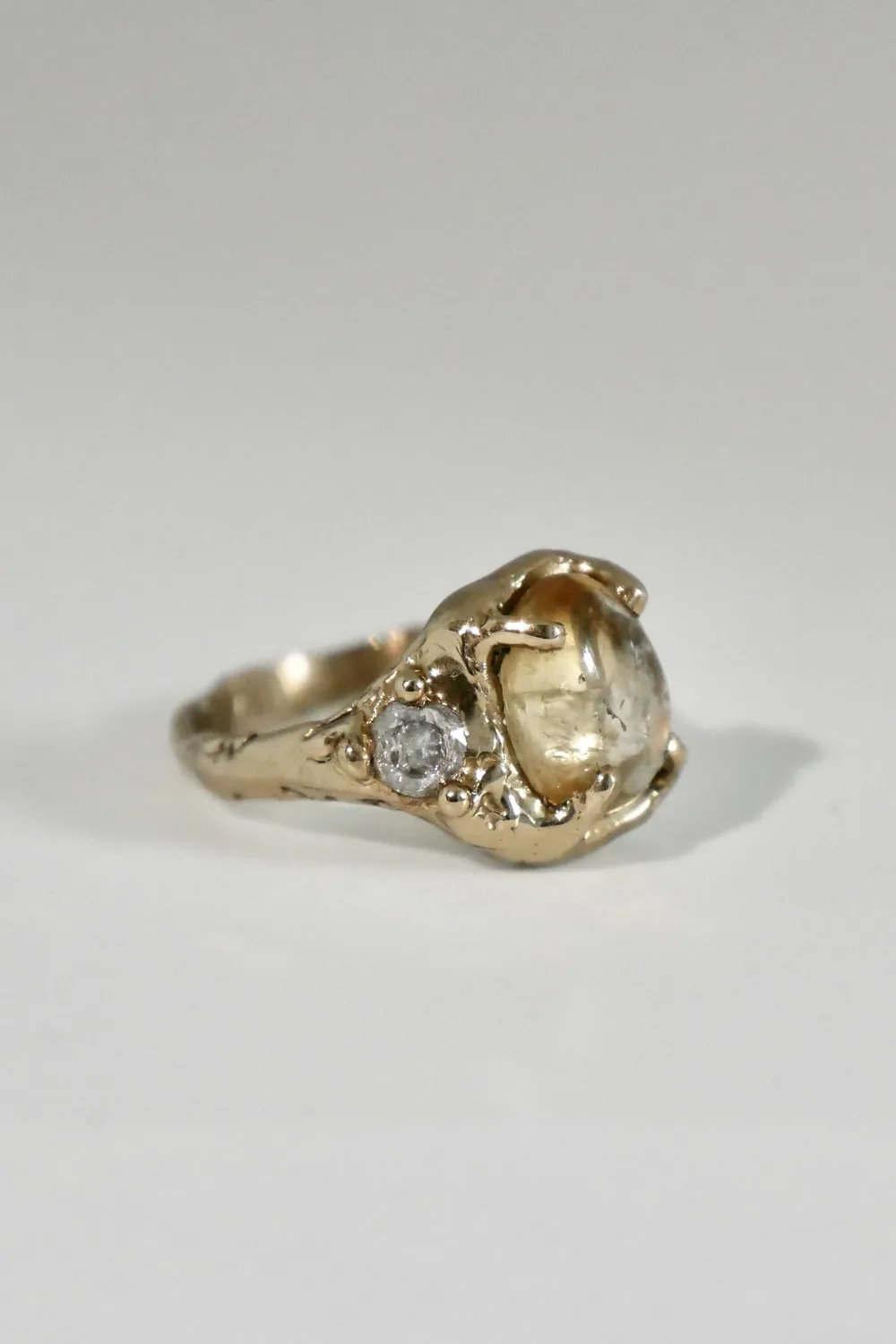
We picked the test subject on purpose, and the choice does more work than the prompts do.
It is a vintage gold ring with a translucent cabochon, an organically cast band and a single small diamond on one shoulder. It is not a clean modern solitaire. The stone is irregular rather than faceted to a standard cut. The band carries casting marks, uneven scrollwork and a slightly asymmetric profile, the kind of surface a manufacturing engineer would call a defect and a vintage buyer would call the reason they bought it. The side diamond is small enough that a generative model can quietly decide it was noise and remove it.
That combination is the point. A plain solitaire on a plain band gives every tool an easy pass, because there is nothing distinctive left to lose. This ring makes the difference between reproducing a piece and inventing a similar one visible at a glance.
2. The six tools, and how we scored them
Two families of software show up under the same search. Design tools take your photo as a reference and generate a new piece in the same spirit, which is useful at the sketch stage and wrong for a catalogue, because the customer receives the item in the picture. Photo tools keep the pixels of the product and rebuild the scene around them.
The tools people actually search for when they look for the best AI app for jewelry photography are, almost without exception, in the second group. So that is the group we tested, and we picked the six that carry the most search demand in this niche.
| Tool | What it is | Free tier |
|---|---|---|
| Pixelcut | Cutout-and-background editor with an AI scene generator bolted on | Free plan, 8 credits on our balance |
| Photoroom | Background replacement and AI scenes, strong mobile heritage | Free plan, background replacement only |
| Claid.ai | E-commerce imaging platform, credit-metered per operation | Free plan, 50 credits |
| PicCopilot | Marketplace-oriented template and preset builder | Free plan, 25 Pcoins, not renewed |
| SellerPic | Chat-driven editor that routes a request to whichever of its image engines fits | Free plan, 20 credits |
| Amplyar | Scene-preset generator for product photography (ours) | Free plan, 7 welcome credits |
None of these six invents a new piece of jewellery for you. If that is what you need, you are shopping in the other family and this comparison is the wrong one to read.
Every tool received the same 2432×3040 photograph and the same two prompts, typed exactly as written, with default settings wherever they existed.
The two prompts, verbatim
Scenario A · studio:
Studio product photo on a black background
Aspect ratio 1:1Scenario B · on model:
Worn by a model
Aspect ratio 9:16
Short prompts are deliberate. A seller with forty listings writes one line and expects sensible defaults, so the prompt is the control and the defaults are what is being measured. Everything ran through each product's own web interface, never an API, so no tool got a privileged path.
Each output was marked out of five on three criteria, in both scenarios.
- Product fidelity. Is this the same piece? The irregular cabochon, the cast texture on the band, the single side diamond, the exact warmth of the gold. Five means a buyer receiving the item would recognise it instantly at full zoom. One means the tool returned a different ring.
- Brief and scene. Did it do what was asked? Was the background actually black, was the aspect ratio the one requested, is the piece framed the way a jewellery listing needs it framed. Five means the brief was executed as written. Low scores here are usually not about pixel quality: a technically beautiful frame that shows the ring as a tiny out-of-focus dot has failed the brief.
- Light and presentation. Does the piece sell itself? Rim light along the metal edge, physically plausible highlights on the stone, a contact shadow and reflection that put the object on a surface rather than floating it on a rectangle. Five means it reads as a photograph someone lit. Two means a cutout dropped onto a dark background.
That is 15 points per scenario and 30 across both. The rubric is identical for the studio photo and the on-model photo, which lets the two be compared directly.
One more rule, and it constrains everything: we only used the free version of each product. No trials, no upgrades, no annual plans bought to unlock a feature mid-test. It is how most people evaluate software before committing a catalogue to it. If a tool will not put a ring on a hand without a card, that is information about the tool, not a gap in the test.
3. The scoreboard: the best AI for jewelry photography in numbers
| Tool | Studio /15 | On model /15 | Total /30 | Rank |
|---|---|---|---|---|
| Amplyar | 15 | 14 | 29 | 1 |
| SellerPic | 12 | 13 | 25 | 2 |
| Claid.ai | 12 | 11 | 23 | 3 |
| Photoroom | 15 | paywall | n/a | studio only |
| PicCopilot | 13 | not supported | n/a | studio only |
| Pixelcut | 11 | paywall | n/a | studio only |
Read that table carefully, because the ranking column is doing something specific. Three tools completed both scenarios on a free plan and can be ranked out of 30. Three could not, for two different reasons, two paywalls and one product limitation, and ranking them out of 30 would be scoring them for a test they were never allowed to sit. So they are ranked on the scenario they did complete.
The most important line in the table is Photoroom's. It produced the joint-best studio image in the test, a clean 15 of 15, and on studio work alone there is nothing between it and the top. It leaves the combined ranking because its on-model tool is a paid feature, not because it lost on quality.
4. Scenario one: the studio photo on a black background
Black is a deliberately hostile brief for jewellery. Gold on black either picks up a rim of light along its edges or dissolves into a dark smudge, which separates tools that relight a scene from tools that paste a cutout onto a dark rectangle. For anyone comparing an AI jewelry photo generator on still-life work, this single prompt is the most informative two minutes you can spend.
| Tool | Fidelity | Brief & scene | Light | Total /15 |
|---|---|---|---|---|
| Photoroom | 5 | 5 | 5 | 15 |
| Amplyar | 5 | 5 | 5 | 15 |
| PicCopilot | 5 | 4 | 4 | 13 |
| SellerPic | 3 | 5 | 4 | 12 |
| Claid.ai | 4 | 5 | 3 | 12 |
| Pixelcut | 5 | 4 | 2 | 11 |
The fidelity column is where this test earns its keep, and it is the column most round-ups get wrong. At thumbnail size all six look like the same ring, which is how a comparison written from a contact sheet concludes that product identity is a solved problem. At full zoom two of them are not.
SellerPic is the clearer case. Its stone comes back rounder, larger and more faceted than the cabochon we uploaded, closer to a polished dome than the irregular surface in the input file, and the side diamond grows with it. The result is attractive and it is a different ring, which costs it two fidelity points. Claid.ai loses one for a subtler change: the cast band is rendered noticeably thinner through the shoulders than the original, so the heavy vintage proportion that makes the piece recognisable is gone even though every element is still present.
The other four held. Photoroom, Amplyar, PicCopilot and Pixelcut all returned the cabochon at its real shape, kept the casting texture, and left the side diamond where it was. On a deliberately awkward vintage piece, that is the result worth knowing.
What each tool produced
Photoroom, 15/15, about 36 seconds, free tier. The best single image in the test alongside Amplyar. Genuine rim light along the band, visible surface texture under the ring, and a real contact shadow so the piece sits on a surface rather than floating. Delivered at 1512×1512 with no watermark. Route: Backgrounds › AI Backgrounds › Custom Background › Manual prompt, which is the free path. The “Describe an edit” field is Pro.
Amplyar, 15/15, about 10 seconds, 2 credits. Accurate product, correct warm gold, deep black field with a genuine rim light and a reflection under the band. The tool auto-classified the upload as “Antique Gold Ring with Diamond Accent” without being told, and printed the price on the button before we spent anything. Free-tier output carries a small corner watermark.
PicCopilot, 13/15, 5 Pcoins. A good image, and one we nearly reported wrongly. The black studio background is not in the curated scene gallery; it is the first preset inside a separate Scene template block in the same tool, which is easy to miss. Once found, the result is strong: rim light along the contour, a plausible shadow under the band, product fully intact. It loses a point on brief because the scene arrives as a preset rather than something you describe, and we found no free-text scene field on any path we opened. It delivers at 1080×1080 with a corner watermark.
SellerPic, 12/15, about 8 to 10 seconds, 1 credit. The cheapest single run in the test, and the one that quietly redesigns the product. Light and framing are both good: realistic top light, a believable shadow, correct black field, one point off for a flatter result than the top two with no clear rim along the metal edge. The problem is the stone. Compare it against the input at full zoom and the cabochon has been rebuilt rather than reproduced.
Claid.ai, 12/15, about 8 seconds, 4 credits. The most literal background swap of the six. The cutout is immaculate, the original 2432×3040 resolution is preserved and there is no watermark. What it does not do is relight: no contact shadow and no reflection, so the ring reads as a composite pasted onto black. It also thins the band, which is the fidelity point it drops.
Pixelcut, 11/15, free tier. Architecturally different from the rest, and the score follows directly from the architecture. Pixelcut cuts the product out and places it on a new background rather than relighting it in a new scene. You can literally see the ring sitting on a transparent checkerboard in the editor, with background, shadow and AI scene as three separate controls. The product survives perfectly and there is a soft reflection underneath, but the metal gets no rim light, and a black background is reachable here with one click on a colour swatch and no AI at all. Honest tool, flat result.
5. Scenario two: the same ring on a model
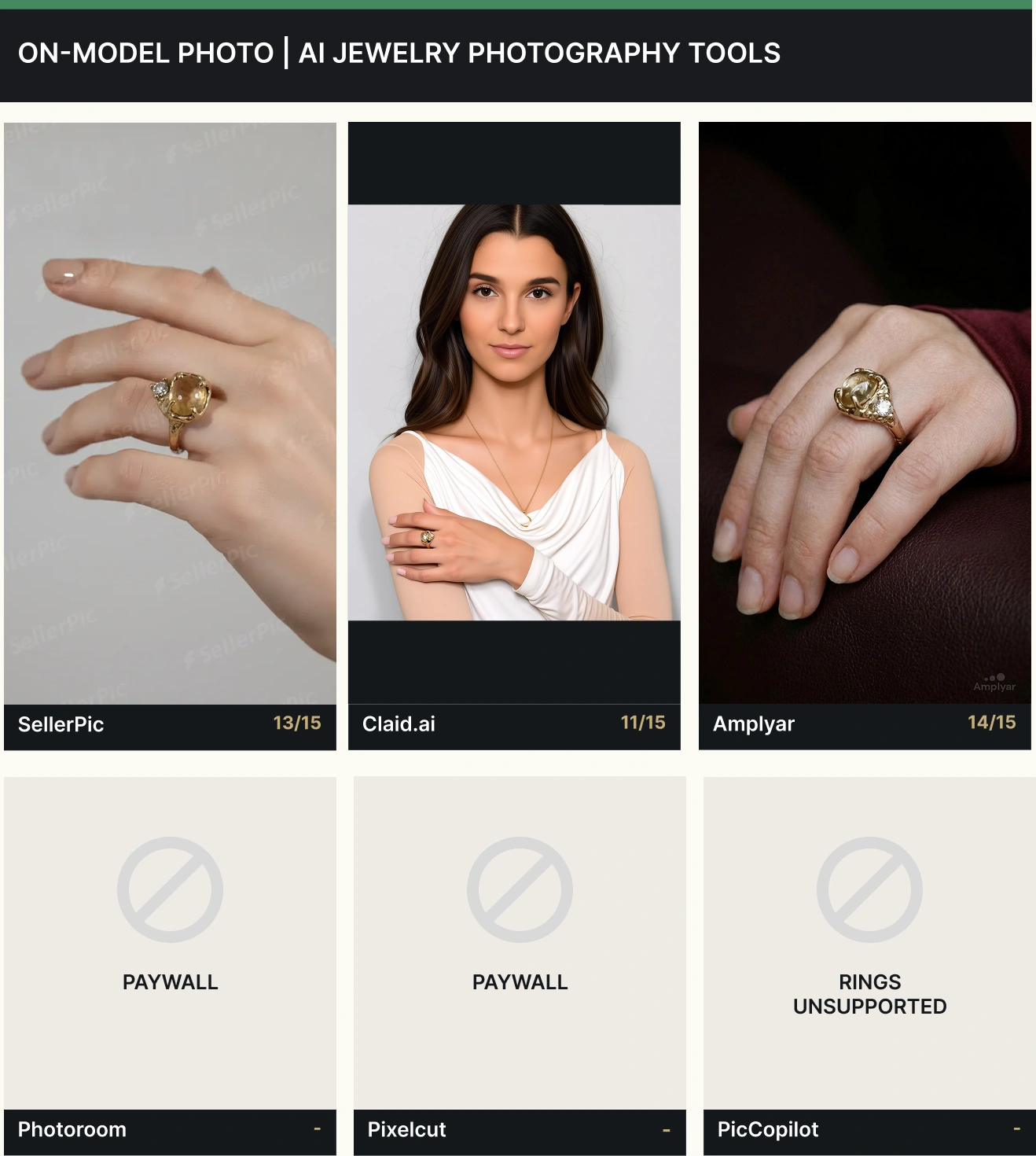
Most jewellery listings need an on-model photo, because it is the only image that answers the size question. It is also where a free tier stops being a marketing line and starts being a constraint, and where the field for the best app for jewellery photography narrows from six to three.
| Tool | Fidelity | Brief & scene | Light | Total /15 |
|---|---|---|---|---|
| Amplyar | 4 | 5 | 5 | 14 |
| SellerPic | 4 | 5 | 4 | 13 |
| Claid.ai | 4 | 2 | 5 | 11 |
| Photoroom | — | — | — | paywall, AI Fashion Models is a Pro feature |
| Pixelcut | — | — | — | paywall, the Product Studio Jewelry format is paid |
| PicCopilot | — | — | — | rings are not a supported try-on category at any tier |
What each tool produced
Amplyar, 14/15, about 20 seconds, 2 credits. The ring on a relaxed hand against a dark burgundy leather background, delivered vertically at 768×1376. Anatomy correct down to the knuckles and nails, the ring seated naturally on the finger, and the same physical piece as its studio image, same cabochon, same side diamond, same cast band. The framing is jewellery framing: the hand fills the frame and the ring is large and sharp. On closer inspection the cabochon in the on-model frame reads slightly different from the stone in the input photo, which costs it one fidelity point.
SellerPic, 13/15, 1 credit. Correct hand anatomy, no invented extra jewellery, and the same sound instinct about framing, with the hand occupying most of the 768×1344 frame and the ring reading clearly. It carries its studio problem across: the cabochon is softened and rounded again and the side diamond barely reads, which is the fidelity point it loses. Light costs it another for a plainer studio grey environment than the top result. Worth knowing separately: on the free tier the frame is tiled with repeated SellerPic marks across the whole image, which no crop will remove, so the picture is not publishable until you pay.
Claid.ai, 11/15. The most interesting failure in the test, because the picture is beautiful. Claid returns an editorial portrait: the light is the best of the three, the skin and fabric are photoreal, the resolution matches the input exactly, and there is no letterboxing. It scores five for light and loses almost everything on brief. Claid photographs a person, not a piece of jewellery. The ring occupies a tiny fraction of the frame and sits outside the depth of field, so cropping to the hand leaves a soft, unusable product image. It also drops a fidelity point for adding a delicate gold chain and pendant that were never in the input file, a second item the seller does not stock, in a photo meant to sell the first one.
Photoroom, paywall. On-model generation routes through AI Fashion Models, which is a Pro feature. Nothing to score.
Pixelcut, paywall, but the right kind. Worth separating from Photoroom, because the underlying product is better set up for this than almost anything else in the test. Pixelcut's Product Studio has a dedicated Jewelry format tab, a preset described as an on-skin close-up on a wrist, neck or ear, and a Placement selector that explicitly includes Finger. Conceptually that is exactly what a jewellery seller needs. Press Generate on the free plan and you get an upgrade screen. The capability exists and is well designed, it is simply paid.
PicCopilot, not supported at any price. Its Virtual Try On states its supported categories outright: bags, hats, necklaces, earrings, glasses. Rings and bracelets are not on that list, which makes this a product boundary rather than a paywall, and no plan unlocks it. For a ring seller the on-model photo is unavailable here full stop, and the only way to discover that is to open the upload dialog, because it is not on the pricing page. We switched to earrings to test it fairly, and the balance dropped from 20 to 10 Pcoins before the upgrade prompt appeared, so we were charged for a result we were never shown.
For on-model work specifically, jewelry model photography goes deeper into framing and skin tone than a single benchmark can.
The on-model photo is the one buyers scroll for, which is why an ai jewelry photo generator should treat it as a default rather than an upgrade.
6. What each plan costs, and what it actually buys
Pricing in this category is messier than it should be, and the messiness is the finding. Below, every figure is in US dollars, read from each product's public pricing page or its in-product billing screen on 23 and 24 August 2026.
| Tool | Free tier | Cheapest paid plan | Annual, per month | Included per month |
|---|---|---|---|---|
| Pixelcut | 8 credits, export without watermark | $10 (Pro) | $8 | 600 credits |
| Photoroom | Background replacement, export cap | $12.99 (Pro) | $7.50 | 8,000 credits |
| Claid.ai | 50 credits | $15 (Essentials) | $9 | 500 credits |
| PicCopilot | 25 Pcoins, not renewed | $4.99, billed $59.88 a year | $4.99 | 300 Pcoins |
| SellerPic | 20 credits | $29 (Starter) list | $14.50 promo, billed annually | 200 credits |
| Amplyar | 7 welcome credits | $11 (Basic) | $9 | 100 credits |
7. Verdict: the best AI tool for jewelry photo, by job
There is no single winner for everyone, and any article naming one without a scenario attached is selling something. Here is what 27 individual marks across six tools resolve to.
Best overall on a free plan: Amplyar, 29 of 30. The only tool that scored 15 in the studio scenario and 14 on model, with accurate product, correct brief and real light in the studio frame and the on-model frame alike, at 2 credits an image with the price shown before you spend it. It is our product, so weigh that accordingly. The scores are in the tables above and the losses of the other five are described rather than implied.
Best studio image, full stop: Photoroom, 15 of 15. Joint top of the studio scenario, with the most convincing light in the test. If your listings need one perfect still-life image per piece and nothing else, this is the best app for jewellery photography in the group. On-model generation is Pro.
Cheapest way to fill a catalogue: SellerPic, 25 of 30. Second overall, and the lowest credit rate in the test by a wide margin. Two caveats decide whether that matters to you. It rebuilds an irregular stone into a rounder one, so it suits plain settings better than vintage pieces, and on the free tier it tiles watermarks across the whole on-model frame rather than tucking one into a corner.
Most predictable and most transparent: Claid.ai, 23 of 30. Exact resolution preservation, no watermark, and the clearest cost accounting in the test. Do not use it for on-model photos of small pieces: it makes portraits of people, and your ring will be a soft dot in the corner.
Skip if you sell rings: PicCopilot for on-model work, because rings are excluded from its try-on at every price tier, and Pixelcut if you need relit metal rather than a cutout on a new background. Pixelcut's paid Jewelry format with a Finger placement is still the best-designed on-model feature we saw and may well be worth the $10.
If you have picked one, the next step is running your first piece through it end to end — the AI jewelry photography tutorial walks the whole flow from upload to on-model shot in 104 seconds.
If you are still deciding which is the best AI app for jewelry photography for your own catalogue, run this test yourself before committing to anything. Upload one piece, generate one studio image and one on-model image, and compare the stone, the band and the rest of the frame against the original at full zoom. Everything else is preference. Those two images are a fact, and they take five minutes to produce.
If you have not photographed the input yet, our guide to photographing jewelry at home covers the setup with a window and a sheet of paper, and the complete guide to jewelry product photography covers what a good input looks like. The rest of the category lives in our jewelry and accessories photography guides.
Frequently asked questions
Across both scenarios on free tiers, Amplyar scored highest at 29 of 30, ahead of SellerPic at 25 and Claid.ai at 23. Photoroom tied for the best studio image at 15 of 15 but puts its on-model tool behind a paid plan, so it could not be scored on the second scenario.
Only three of the six produced both a studio photo and an on-model photo without payment: Amplyar, SellerPic and Claid.ai. Photoroom and Pixelcut put on-model generation behind a paywall, and PicCopilot does not support rings in its try-on at any price.
Mostly, but not universally, and the failures are subtle. Four of six reproduced our irregular cabochon exactly. SellerPic enlarged it into a rounder, more faceted stone, and Claid.ai thinned the cast band. Compare the stone and the shoulders against your original at full zoom before publishing.
Free allowances ranges from 7 credits to 50 and some features may be limited to paid plans only.
Daria Bazankova
Writes about e-commerce imagery and AI at Amplyar.
Published 24 August 2026. Scores come from a single run per tool per scenario on free tiers, with the prompts and default settings stated above, so they measure these outputs rather than a statistical average. Prices were read from each product's public pricing page or in-product billing screen on 23 and 24 August 2026 and change often. Amplyar is the publisher of this article and one of the tools scored.
Keep reading
Facebook jewelry ads that work in 2026
10 min read · 27 Aug 2026
AI Jewelry Photography Tutorial: One Phone Photo to Amazon, Shopify and Etsy Listings
8 min read · 19 Aug 2026
Jewelry model photography: how to get on-model shots without a model
9 min read · 13 Aug 2026