Quick Verdict
- What Claid AI is. A product-image editor from the team behind Let's Enhance, aimed at e-commerce merchants who want a batchable, engineer-friendly editor for background swaps, upscales and lifestyle scenes.
- Claid AI pricing starts at $9/mo billed yearly (Essentials, 500 credits) and goes to $35/mo yearly (Pro, 2,000 credits). Business is sales-led custom.
- Where it wins: batch-clean background swaps and upscales at scale.
- Where it falls short for jewelry sellers: Claid's virtual try-on is built for apparel (tops, bottoms), wide human-scale framing with no product focus. On a ring, the shot reads as a hand in a lifestyle scene, not a shoppable jewelry image.
- Claid alternatives worth comparing: Amplyar scored 29/30 vs Claid's 23/30 on the same-ring benchmark (14 vs 11 on the on-model shot), adds ad videos, ghost mannequin, an ad-banner and templates library, and a $79/mo self-serve Scale plan with no sales call.
Feature Comparison
| Feature |  |  |
|---|---|---|
| AI product photos (studio backgrounds) | Yes | Yes |
| On-model / virtual try-on | jewelry and accessories supported | Tuned for apparel (tops, bottoms), no product focus on small items |
| Ghost mannequin | Yes | No |
| AI ad banners / creatives | Full ad-banner generator with a templates library | Only a primitive add-text on an existing image |
| Ad videos | Yes | Yes |
| Background removal | Yes | Yes |
| Image upscaling | 4K on paid | 2K on Essentials, 2K/4K on Pro |
| Model Maker (custom AI model of your product) | Yes | Yes |
| MCP access via Claude / ChatGPT | Yes | No |
| Own AI engine (not a router) | Yes | Yes |
| Watermark on free tier | Small corner mark | None |
| Commercial rights | Included on all paid plans | Included on all paid plans |
| Top-tier plan | Scale $79/mo, self-serve, transparent price, no sales call | Business, custom, sales-led |
Claid AI Pricing Breakdown (2026)
Claid AI runs on a monthly credit budget. Credits spend per operation (typical edit ≈ 4 credits), no rollover, no watermark on any tier.
| Plan | Monthly | Yearly (per month) | Credits / mo | Highlights |
|---|---|---|---|---|
| Free Trial | $0 | $0 | 50 (one-off) | All Standard tools, up to 2K, no watermark |
| Essentials | $15 | $9 | 500 | Full toolset, up to 2K, chat support |
| Pro (Most Popular) | $49 | $35 | 2,000 | Premium tools incl. 2K/4K, 3× history, uploads up to 64 MP, priority queue |
| Business | Custom | Custom | Unlimited | Custom SLAs, dedicated support, sales-led, requires a call |
Last verified: 2026-09-03 (from Claid AI pricing modal, monthly and annual tabs).
Claid AI pricing vs Amplyar at the top tier. If you're scaling volume, this is where the two products diverge on principle. Claid pushes serious users into Business (custom, sales-led), that means a discovery call, back-and-forth on quotas, and a contract before you get pricing. Amplyar publishes a $79/mo Scale plan with 1,500 credits, self-serve, upgrade from your dashboard, no call, no negotiation, no minimum term. Fast-moving e-commerce teams shouldn't have to book a demo to spend more money.
Claid AI Review 2026: The Complete Guide
Overview
Claid AI is the e-commerce product of Let's Enhance. Positioning is squarely at merchants who want a batchable editor: background swap, upscale, shadow fix, run 300 SKUs through it, done. Two paid tiers, then a custom Business plan.
Key Features
- AI Edit, free-text prompt on a product image; the workhorse tool.
- AI Photoshoot, lifestyle-scene generator; tuned for apparel and human-scale subjects.
- Background templates, preset backdrops.
- Model Maker, custom model fine-tuned on your product line.
- Upscaling, denoise, shadow generation, inherited from Let's Enhance.
- Ad videos, short generated video from a product image.
How we tested it
Same vintage cabochon-and-diamond ring, same free tiers, one run per tool per scenario, published in our jewelry benchmark at Best AI for Jewelry Photography in 2026. Six tools total; Claid ranked #3 overall at 23/30.
The on-model test, where Claid AI is not built for jewelry
This is the section every jewelry seller should read before subscribing.
Prompt used: Worn by a model, aspect ratio 9:16, one run per tool, no re-rolls.
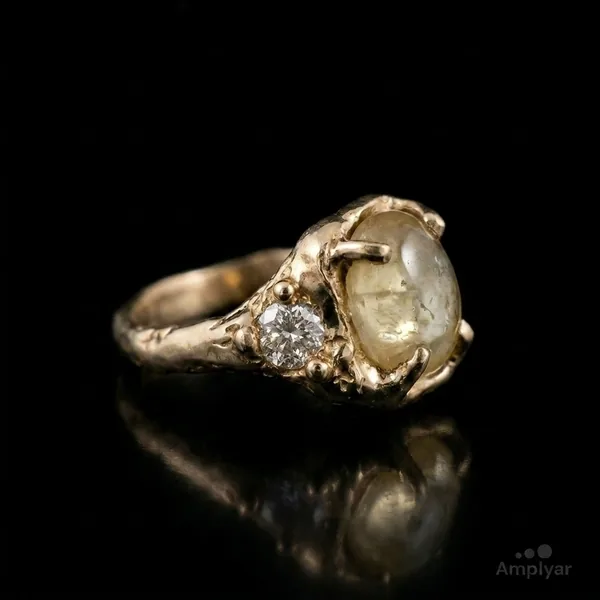
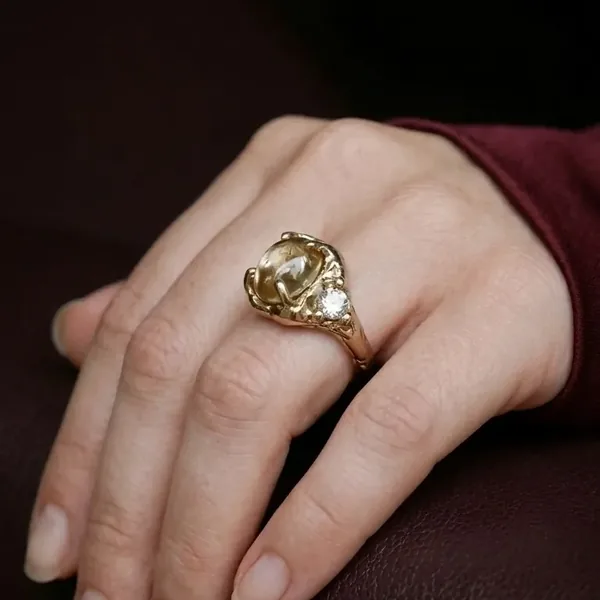
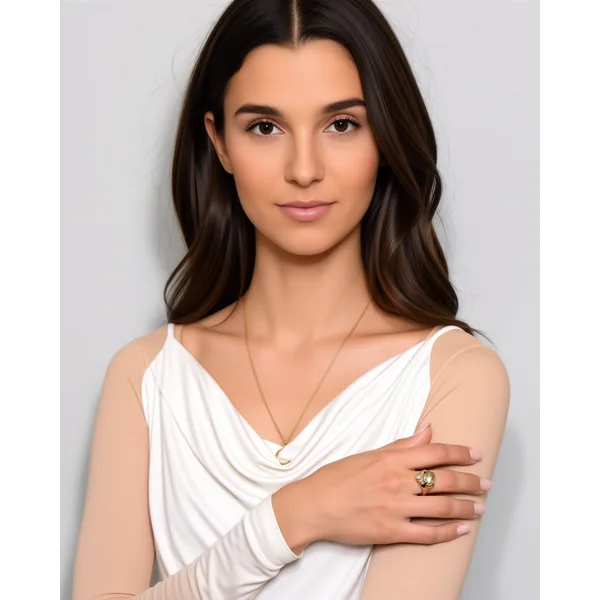
What's actually going on. Claid's virtual try-on is designed for apparel: tops, bottoms, streetwear flat-lays turned into on-model shots where the garment fills the frame because a garment naturally does. That framing logic doesn't transfer to jewelry. Given a tiny subject, the tool composes for the person and the scene, not for the product, and the ring ends up as one small element in a wide portrait. There is no "zoom to the piece" behavior, no jewelry-aware crop, no product-focus mode.
There's a second, related issue: the AI Prompt Assistant pre-fills the prompt field with a lifestyle description ("Neutral lifestyle photo of the ring on a dark matte stone slab..."). A first-time user who accepts the suggestion won't get a worn shot at all, they'll get a flat-lay on a stone slab. Amplyar takes Worn by a model verbatim and returns a close-up macro that focuses on the piece.
Why it matters. For a jewelry PDP, the on-model shot is the buy-button image. It has to fill the phone screen and it has to focus on the piece. When the on-model output is a wide lifestyle composition, it doesn't sell, it decorates. This is the specific workflow where Claid AI collides with the jewelry category, and it's the reason jewelry sellers researching Claid alternatives end up on this page.
Ads and templates, where the gap is widest
Ad creatives is the other axis where Claid AI is out of scope for a merchant who wants to ship a campaign, not just a product shot.
- Amplyar ships a full ad-banner generator with a templates library, pre-built layouts for launches, seasonal sales, retargeting, category headers, and short ad videos from a single product image.
- Claid AI does not have an ad-banner generator. What it has is a primitive add-text step on top of an existing image: you can overlay a text block, but the tool won't design the banner, pick the type hierarchy, or lay out a promo composition for you. In our test the model attempted a banner-style output and returned an unreadable text layer, expected for a tool that isn't actually a banner product.
If ads are part of your workflow (they usually are), this gap doubles the tooling you'd need alongside Claid.
The studio shot, clean, but not a highlight
Being direct about it, per our published benchmark: Claid AI's studio output is "the most literal background swap of the six", the cutout is clean, original resolution is preserved, no watermark. But there is no relight, no contact shadow and no reflection, so the ring reads as a composite pasted onto black, and the tool thins the band, which is the fidelity point it drops. Score: 12/15 (behind Amplyar and Photoroom at 15/15).
Good enough for a bulk catalog refresh where a flat cutout on a solid background is the goal. Not the reason you'd choose Claid AI over Claid alternatives if final-image quality matters.
Pros and Cons
Pros
- Clean, literal background swap at original resolution, no watermark on any tier.
- Two paid tiers (Essentials/Pro), simple to pick.
- Model Maker for a custom model fine-tuned on your product line.
- Ad-video generation from a product image.
Cons
- Virtual try-on is built for apparel, not jewelry, no product focus on small items.
- AI Prompt Assistant pre-fills the prompt with a lifestyle description; first-time users get a flat-lay instead of a worn shot.
- No real ad-banner generator, only a primitive add-text overlay.
- No templates library for creatives.
- No ghost mannequin.
- No MCP integration, can't be driven from Claude or ChatGPT as part of an assistant workflow.
- Top tier is sales-led Business only, no self-serve high-volume plan.
User Experience and Performance
The dashboard is quiet and information-forward, it inherits the Let's Enhance UI language. Studio operations return in about 8 seconds; on-model generation in about 12. Uploads default-strip the background, which saves a step for merchants but occasionally trips over inputs that were already clean (Claid warns and lets you proceed).
The rough edge is that the polish stops at the "cutout" side of the workflow. Anything creative, a worn shot on a small subject, a banner, a lifestyle scene, inherits the limits of the underlying model and the apparel-first framing bias.
Who is Claid AI For?
Great fit if:
- You run e-commerce with a large catalog and need clean, batchable background swaps and upscales.
- Your on-model needs are apparel, tops, bottoms, where the garment naturally fills the frame.
Less good fit if:
- Your category is jewelry, watches, or accessories where the on-model shot has to focus on the piece.
- You need ad banners with templates or ghost mannequin in the same tool.
- You want to scale to high volume without a sales call.
- Your workflow lives inside Claude or ChatGPT and you want to drive image generation from there via MCP.
Amplyar vs Claid AI, the 2026 showdown
1. Pricing, comparable at entry, Amplyar wins on transparency at scale
| Tier | Amplyar (yearly) | Claid AI (yearly) | Notes |
|---|---|---|---|
| Entry paid | $9/mo, 100 credits | $9/mo, 500 credits | Same $ tag. Claid gives more credits; Amplyar gives publishable on-model jewelry shots at that entry. |
| Mid tier | $31/mo, 500 credits | $35/mo, 2,000 credits | Claid heavier on volume, Amplyar heavier on scope (ad videos + Model Maker + MCP + templates included). |
| Top tier | Scale $79/mo, 1,500 credits, self-serve, no sales call | Business, custom, sales-led | Amplyar publishes the number; Claid puts you on a call. |
The honest read on Claid AI pricing: it's competitive at entry and reasonable in the middle, but the moment you outgrow Pro you're forced into a discovery call. Amplyar's Scale plan is a checkbox in your dashboard.
2. Features, the divergences that matter
| Feature | | |
|---|---|---|
| Virtual try-on for jewelry / accessories | product-focused framing | apparel-tuned, no product focus |
| Ghost mannequin | Yes | No |
| Ad banners with templates library | Yes | add-text only |
| Ad videos | Yes | Yes |
| Model Maker | Yes | Yes |
| MCP (Claude / ChatGPT) | Yes | No |
| Self-serve top-tier plan | Scale $79/mo | Business is sales-led |
3. Quality, same test, on-model side by side
From the same-ring benchmark at Best AI for Jewelry Photography in 2026, one run per tool per scenario.
| Scenario | Amplyar | Claid AI | Winner |
|---|---|---|---|
| Worn by model (9:16) | 14/15 | 11/15 | Amplyar (Claid: wide lifestyle framing, no product focus) |
| Combined /30 (all scenarios) | 29 | 23 | Amplyar +6 |
Side-by-side (Original / Amplyar / Claid) shown in the on-model section above.
Final Verdict
Claid AI, 3.5 / 5. A batchable e-commerce editor that does clean background swaps at scale. The category fit is the gap: virtual try-on is tuned for apparel and doesn't focus on small products, ads are a text overlay rather than a real banner generator, and high-volume users are pushed into a sales-led Business plan. For merchants researching Claid alternatives on the jewelry, watches or accessories side, we'd recommend a tool built for the category, including our own.
Which Should You Choose?
Choose Claid AI if:
you run a large apparel-adjacent catalog and your primary need is batchable studio background swaps and upscales.
Choose Amplyar if:
you sell jewelry, watches or accessories where the on-model shot has to focus on the piece; you want ad banners with templates and ad videos in the same tool; and you want to scale to a top-tier plan without booking a demo.